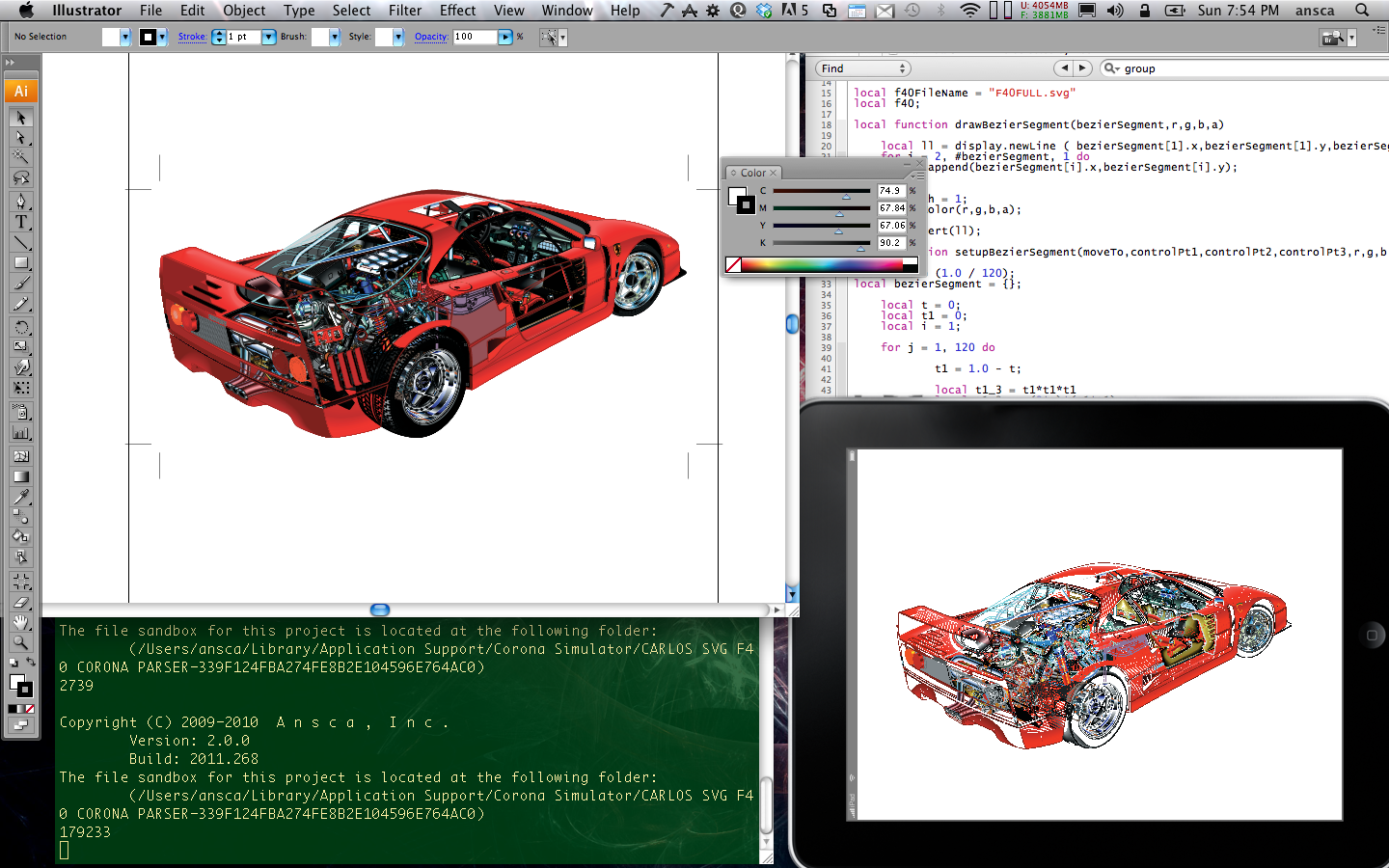
Teaser Post

Like the adage says, a picture is worth a thousand words. I will let the images speak for themselves.

Questions?

I used to work at Deneba Canvas back in the early 90’s. Canvas had a famous drawing that became iconic with the software package which was that of a cut-away of a F40 Ferrari. The original illustration was done by David Kimble who spent like 6 months at the Ferrari plant going through technical drawings, specs and what not. David Rumfelt was a ‘computer illustrator’ at Deneba, and reproduced Kimble’s illustration. He vectorized it into Canva objects, and if memory serves me right it took him almost 3 months.

The original drawing had about 28,000 objects because of the limitation on PCs of yesteryear, mostly because on the Mac, there was this thing that probably a few of us has have to deal with, that of Fixed number notation. Ergo, the reason Canvas 3.0 had a limit on the number of objects on the display list.

I few months ago, I realized I had the a version of the file F40 in Illustrator format, from when I started working in Illustrator back at Adobe. I took the F40 eps file, exported as SVG and read it into the Corona SDK simulator using a simple SVG parser.

Thats my teaser for now, and to the folks who bought Deneba, don’t send your lawyers as am not ‘commercializing’ the image. It is for my own private use. From a product that I have been fond of, and proud to have been a member of its core engineering team. Mario, Patrick, Sanjay, Phil, Dave, Gerry, Tom, Mark, Joaquin, Jorge, Steve and a few others. Here is to the original days of Canvas.

What does it all mean?

Carlos

The Utah Teapot 3D Wireframe rendering using Corona SDK

Continuing my topics in computer graphics, something which am very fond of, I took an OFF file, which is a standard data file format for polygon shapes, I read it into Corona, parse it, and then compute the faces and then render the wire frame all using native Corona objects. I use some heuristics to calculate the Z distance to fade out the color when the object renders away from the camera(view).

Here is a video of a 3D wireframe rendering of the famous Utah Teapot, also known as the sixth platonic solid,  on you tube at http://bit.ly/g9LlG9

Carlos.

ps: Martin Newell, responsible for the Utah Teapot, worked a few offices from my office when I used to work in the Adobe Illustrator group. Words cannot describe what a perfect gentleman he is, and his brilliance as well as his humbleness is truly amazing.

Who’s on First, What’s on Second, I Don’t Know is on third…

With apologies to Bud Abbot and Lou Costello.

One of the nicer perks of being on the razor edge of technology is being able to see and play with a variety of devices. Some will make it to the market, some of them will never get out of an R&D lab, and some will flounder and be buried in the pantheon of devices that once ruled the mighty mobile lanscape. (how is this for an opening paragraph?)

I get exposed to a lot of devices — from multiple manufacturers, from all sizes, from all colors, and ranging from specific market segments to the ones positioning themselves as an “all-in-one” device. Yes, there are some devices striving to be a swiss army knife of sorts  while others strive to be more incisive in a “just do one thing good above all other devices” sort of way.

And in this far-reaching techno Tower of Babel, there is a significant question we all ponder and one that I get asked often: Which device do you think is the clear winner? Ergo, the title of this blog — Who’s on first, What’s on second, I Don’t Know is on third…

Who is on first? Which device is number one? Is it the Apple iPad? The Galaxy Tablet? The iPhone 4? The Motorola Droid X? The (now defunct) Google Nexus? The Samsung Galaxy S? Which one, Carlos? Which one is it???

What’s on second? Which device would be number two? Well, I’m pretty sure that it has to be an Android device. Sure, iOS is the mobile OS, but Android — purely by default — has to be number two.

I Don’t Know is on third — Microsoft’s WP7. Nokia, Samsung’s Bada, Asus Tablets, ViewSonic Tablets. I’m sure that the new Motorola tablet that is rumored to be announced at CES will be the one to beat.  Then again, maybe not! Maybe this new Motorola Xoom (?) will climb up the charts to be number one and dethrone the iPad, and make for a formidable competitor to the Galaxy Tablet. Then again, maybe some unknown tablet that is yet to be announced will take the coveted first place position.

So, which one is it?

NONE! No tablet — whether it is an iPad, Samsung Galaxy Tablet, NOOK Color, or any other tablet device — is number one.

Sounds like blasphemy, right?

Well, my answer to you is this: There is no clear winner!

Surely the iPad is elegant, well-made, outstanding, and has all the things that one may ever need in a tablet device. The Galaxy Tablet is also outstanding, it is an Android device and although the UI is not as elegant, it is just as outstanding as an iPad in terms of functionality. Features missing on the iPad are available on the Galaxy and the opposite is true. And the NOOK Color, it is by far, one of the best devices out there for eBook reading. It is not an iPad, nor a Galaxy Tablet, and Barnes & Noble is not positioning the device as a tablet — it is being positioned as an eBook reader with tablet capabilities. Combined with an excellent eBook experience, the NOOKColor is a device capable of standing on its own merit against the big boys.

So why no number one?

Because the clear winner here is not a tablet from a specific manufacturer, the real winner here is the software.  Yes, you read that right — It is the software, the app running on the device. And is the app I can run on my iPad, Samsung Galaxy, NOOK, or any other device. What good is it for me to have any of the aforementioned devices, or up-and-coming devices, if i can’t get my personal email, my calendar, my documents, my eBooks, and games? If I can’t log into my corporate VPN and access my intranet to access my corporate documents and edit them, or my user list, forums and make the appropriate changes, the device is just as useless as a red-brick. It is dead weight.

I don’t give a hoot if the device has 27,000×27,000 HDMI output in Super-not-yet-standard-XXLHD format and with THX 20.1 surround sound coming out of the unit — if I can’t get to my movies or to my documents on the device, it is a waste of my time and yours to be carrying around a brick.

The clear winner is the software and, even more so, the software that is available on the different platforms. (read “iOS and Android” since I Don’t Know is still on third. 😉 )

I know — you’ve figured it out, you are smart, you are now saying “This guy is good!” This was all a bait-and-switch to peddle his Corona SDK. Boo hoo, I just wasted a good 15 minutes reading this, and for a second there he had me going.

Well, yes, my company creates a cross-platform app creation solution called Corona SDK. But if you think I am going to bait-and-switch you, here, I will give you my number one app for devices.

DropBox. Between my two laptops and my three desktop units, my iPad, and my Galaxy Tablet, and other tablets that I can’t talk about, DropBox has become my choice of app for synching documents across my disparate OS units.

And with everyone from analysts to pundits who are calling this year “The year of the Tablet,” the software that enables the device to access your documents anywhere, anytime, is the real winner.

Abbott: … Who’s on first, What’s on second, I Don’t Know is on third…

Costello: That’s what I want to find out.

Abbott: I say Who’s on first, What’s on second, I Don’t Know’s on third.

Costello: Are you the manager?

Abbott: Yes.

Costello: You gonna be the coach too?

Abbott: Yes.

Costello: And you don’t know the fellows’ names?

Abbott: Well I should.

Costello: Well then who’s on first?

Abbott: Yes.

Indeed.

Bezier Curve Fitting in Corona SDK

You may be wondering, what does Bezier Curve Fitting algorithm’s have anything to do with mobility and entrepreneurship? Nothing with entrepreneurship, but a lot with mobility. Why? Simple, I wrote a entire bezier rendering algorithm in our Corona SDK which is our framework for building apps with a single code base to both iOS and Android devices, and, also, it just so happens, that curves and surfaces and anything to do with concepts in advanced geometric modeling has been part of me since my days at Deneba while working as an software engineer for their flagship product, Canvas. (This puts me back at around 1991 time frame).

Bezier curves are a form of parametric curve and are commonly used in most 2D software graphic products available today. The type of Bezier curve I normally like to work with are cubic Bezier’s, mostly because I grew up using them and they are the standard parametric curve for PostScript, Illustrator and are pretty much the norm for font outlines. Computational wise, cubic Beziers are costlier versus quadratic. My first exposure to quadratic curves was when I was working on the Flash Authoring tool. I still consider cubic Beziers, the standard.

One of the things that has always been challenging is the fact that mobile devices have been in part, not powerful enough to render parametric curves, and what has been quite costly is the editing of such curves and fitting them to a set of points that are drawn while dragging the mouse and or in the case of the iPhone/iPad, your finger, across the ‘drawing board’. Lucky for us today, most smart phones come equipped with OpenGL GPU’s so the notion of rendering curves are a thing of the past.

Well, not for me, sure I can hand off a set of points and have the GPU render the curve for me, but I am old school. I want to control how I want to draw the points and part of eating my own dog food, is, if our CoronaSDK can mustard such performance heavy algorithm given how we go from Lua to Objc-C etc….

The approach was straight forward, drag the finger across the iPhone, create a line, then, reduce the number of points on the line and finally pass the points through a curve fitting algorithm. Given that I have a set amount of time due to my obligations as a co-founder and others, the first thing I did was to be able to generate a plain old cubic Bezier curve.

That was easy. Tap on the screen four times, create a curve, then move the handles and end points, redraw the curve. See Bezier Curve Editing in Corona SDK. The next thing was just for fun, move an object along the curve. Object along a Bezier Curve in Corona SDK.

Then came the hard part. How do I generate a curve given a set of points that mimics the pencil tool in Adobe Illustrator. Well, being a member of the ACM I set out to find some sort of paper on polygon point reduction. All my research led to Ramer–Douglas–Peucker algorithm.

Once I figured out how to modify the RDP algorithm to fit my needs and had it working, I went looking for my Graphic Gems I book and read Philip J Schneider’s ‘An Algorithm for Automatically Fitting Digitized Curves’. In conjunction with other papers on Curve Fitting from the ACM as well as my other CG books, from Farin’s “CADG 5th Edition”, Mark de Berg’s book “Computational Geometry” and lastly, Schneider’s own book “Geometric Tools for Computer Graphics”, I figured out what the best approach was to create a curve fitting algorithm in Lua using our very own Corona SDK.

Here is the video, Creating a Bezier curve using Polygon Point Reduction and CurveFitting in Corona SDK. And here is the app running on a device, Bezier Curve Fitting on an iPhone with an app created in our very own Corona SDK.

I will be posting the source as soon as I clean it up and optimize it even further for better performance.

Carlos.

ps: Just to be clear, the core fitting code is all Lua. The drawing part is all CoronaSDK.

pss: The premiere book on splines is by the Killer B’s. Beatty, Bartels and Barsky, “An Introduction to Splines for Use in Computer Graphics and Geometric Modeling” By Richard H. Bartels, John C. Beatty, Brian A. Barsky. Although I didn’t have the chance to consult the book for the curve fitting project, it is by far, one of the best books on Splines.