
Moving along in our topic of bezier curves and having an object move along the curve path, I will briefly demonstrate the easiest way to move an object along a curve path, and talk about its limitations.
It is pretty straight forward to move an object along a path. For a bezier curve, we first get all the points that draw the curve and depending on how granular the curve, the number of points you will get back. It is a common trick to render the curve with average granularity, and then re-compute the points at a higher granular level to have as many points as possible to move the object along the path, conversely, you can computer lesser points to give the impression of the object moving ‘faster’.
Unfortunately, the difficulty lies in specifying the object’s speed if using t values. The computed x and y coordinates are not representative of a curve’s length, and a curve’s length and its relationship to the value of t is non-linear.
Pseudo code for this would be something like
local points = computeBezierPoints(granularity,segment[i]);
local p = points[1];
local prevX = p.x;
local prevY = p.y;
local angle = 0;
local prevAngle = angle;
for i = 2; #points do
p = points[i];
angle = math.atan2(p.y - prevY,p.x - prevX);
angle = angle * (180/PIE)
object.x = p.x;
object.y = p.y;
object:rotate(angle-prevAngle);
prevAngle = angle;
prevX = p.x;
prevY = p.y;
end
The above sample shows the first step towards moving an object along a curve path. But as you will see from the two images below, due to the nature of parametrization, t values are not evenly spaced, and depending on the curve, the object will move at different speeds at different t values on the curve segment.
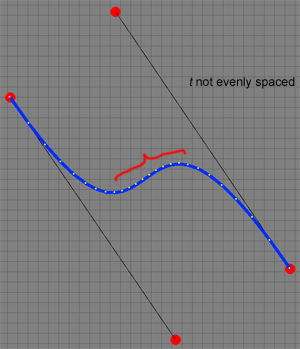
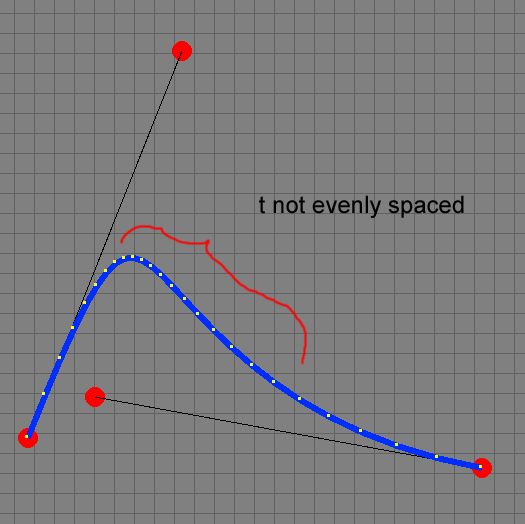
The sample code to move an object along a bezier curve can be obtained by clicking here >>
So the question is, how do we make it so that the object moves seamlessly along the path and not at different speeds depending on its t value?
The answer is simple, computing it, is not. A way to do this is by computing the arc length the curve and re-parametrizing the curve . See “Arc Length Parametrization of Splines Curves” by John W. Peterson at >> .
Next up, what it takes to re-parametrize a curve, but before that, how to render Corona text along a path to demonstrate more fun with Bezier curves.
Carlos.