Carlos

Maybe Adobe is not killing Flash after all. But Google certainly is.

Google debuts Flash to HTML5 Converter. More from InformationWeek

And from Google, the tool can be found at “swiffy

You can accuse me all you want for being biased about our Corona SDK – but be honest, the reality is that Adobe is being embattled from all sides. First Apple, now Google, a long time ‘friend’. Walter and I said it and keep saying it, Flash is not ready for mobile, never was, never is, never will be. Certainly now more than ever.

Carlos

Is Adobe Killing Flash?

Well, I certainly hope so. In light of the recent analyst call where there was no mention of Flash or any Flash related products contributing to their bottom line as well as showcasing a new Flash Like HTML web animation tool called Adobe Edge, one has to wonder what is going on inside of Adobe and its strategy for building on top of the once al mighty Flash platform.

I have received a number of inquires about Corona SDK from Flash programmers who are frustrated with Adobe’s roadmap and song and dance about Flash and how with its Open Screen Project and its AIR marketplace will eventually dominate the app and distribution channels to help foster the Flash/Air/Flex cause.

It has been over 5 years since Adobe purchased Macromedia and Flash has become a second class citizen inside of Adobe. With all its engineering power and deep pockets, Flash still has mediocre performance on Android and abysmal performance on iOS devices. Only for developers to sit and wait now for more than five years.

Is Adobe Edge a symbol of Adobe throwing in the white towel into the mobile ring and giving up after all these years of trying to unsuccessfully attaining the once dominant runtime engine from the web world into “non-pc devices” or is it another bet in its arsenal of the MBA suites covering their asses in case these other platforms succeed. The argument here could be that Adobe is a big company and as any other company with deep pockets can, and will, fiddle with “emerging technologies” and they could afford to foray into un-charted, unproven “technologies”. Adobe after all, is a industry leader and a company that sets the standards. I would agree, but those days are long gone. Long gone.

Whatever it is, and however you see it or Adobe sees it, I will contend that this is a significant blow and a major black eye for Adobe for having spent $3.1 billion on Macromedia for Flash. Only to have Adobe fail to deliver and failed to capitalize on their strength on making Flash the de-facto mobile framework engine.

At the All Things Digital D9 conference, Shantanu failed to answer Mossberg critique of Flash having poor performance on Android devices, even on such devices as the Motorola Xoom. And how about the fracas on the RIMM Playbook using AIR as a core development tool on top of QNX. It is a joke. Not only that, but Shantanu played the “business model” card vs performance card when questioned about Jobs banning Flash from iOS devices. (See: Wired, April 30th, 2010 article)

Well for all of you Flash developers out there caught in the middle of the cross fire, unkept promises and a cloudy future, there is an answer for you, it is called Corona SDK, and now with SpriteLoq, you can take almost all of your Flash assets and convert them to Corona. Unlike Adobe, we are committed to deliver the overall best framework for mobile, we are focused, small, lean and we can adapt to change faster than the loud growling, chest beating, all noise but no action 800 pound gorilla.

We have had the number one game on the iTunes App store, we have the top games across all three major Android app stores, those of Amazon, Google and Barnes and Noble. We continue to have top apps across the board, and we have had a number of apps break past the one millionth download mark. A few days ago, around June 20th, Yobonja, makers of Blast Monkeys, notified us that their game blew past the 2 million download mark. They are currently tracking as the number four game overall on Android market place and number 2 right after Angry Birds in the Action games category.

Proven technology from the guys who brought you Flash-Lite.

We may not have the Adobe name but we have the un-relentless commitment on making our Corona SDK the number one framework for mobile game and app development across all major platforms, with significan focus and drive to make it happen.

Go ahead and download our Corona SDK. Try it for free. You won’t be disappointed. And don’t forget to vote for the features you most like to see implemented in Corona over at our roadmap page.

Visit our “Flash Developers You Will [Heart] Corona” page to learn about Corona vs Flash and how easy it is to get started and porting your Flash games to Corona.

Lastly, don’t get me wrong. There is the “business” of Adobe and there is the “people” of Adobe. I worked with some of the best people in there, I hold high regards for them, smart, fun, witty, brilliant, extraordinarily brilliant. It has been said that if you want to get smart, hang around smart people. And Adobe has a bunch of them and I learned a lot from them. This is not about them. This is about the “business” of Adobe and their inability to deliver. Some of them are just caught in the quagmire of big business politics where the bottom line and cost saving measures is their modus operandi.

The “oh-so-ever-loose cannon”

Carlos

[now in seclusion. whereabouts unknown] And for those who want to burn me in effigy, I will be more than happy to provide you with the gasoline and matches 😉

“…Lua is proving itself as a great language for mobile development….”

But don’t just take my word.

More and more, Lua is proving itself as a great language for mobile development, and Corona SDK by Ansca Mobile has been a key ingredient in this movement.

Roberto Ierusalimschy.
Creator of the Lua Language.

I met Roberto a few years back when we first launched Ansca, thanks to Kore Technologies for putting the lunch meeting together. The entire Ansca staff was at lunch and I remember bringing my Lua book to have Roberto sign it. A year later, vacationing in Rio de Janeiro I met Roberto for dinner. By this time, I had a few screen fulls of Corona based games running on my iPhone and I showed him what our developers were creating with Corona and of course with the Lua programming language. He was happy to see how far you guys push both Lua and Corona to do some amazing games.

Lately, as Lua has broken into the top ten languages in the TIBOE Programming Index, the chatter box around Lua has increased both over at Amazon and other venues.

One surprising factor, to me, was that over at Amazon.com, when you search for Lua,  the results show a related searches section and “corona sdk” shows up.

So yes, I would agree with Roberto. Corona SDK has proven itself not only as a great tool for mobile development, but it is also pushing Lua as the lingua franca for mobile development as well.

Carlos.

Moving an object along a Bezier Curve. Part III

In my previous post, Moving an object along a Bezier Curve. Part II, I discussed how to compute the first derivative of a Bezier curve in order to find its tangent. Today, we will find the 2nd derivative of a beizer curve.

The 2nd derivative is computed by

 \frac{ (d^2)}{(dt^2)} = ((1-t)^3 P_0+3 (1-t)^2 t P_1+3 (1-t)^2 P_2+t^3 P_3) =

 6 (P_0 (-(t-1))+P_1 (3 t-2)+P_3 t+P_2)
.
.
local px2ndDer = 6 * (p1.x * ( -1 * ( 1-t )) + p2.x * ( (3 * t) -2 ) + ( p4.x * t ) + p3.x )
local py2ndDer = 6 * (p1.y * ( -1 * ( 1-t )) + p2.y * ( (3 * t) -2 ) + ( p4.y * t ) + p3.y )
.
.

Why is it important to find the 2nd derivative of a curve in regards to moving an object along a path? It is to calculate the curvature radius of the path at specified parameter t. It measures the rate of change of direction of the curve. It is the tangent’s line turn per unit distance moved along the curve.

To compute the curvature, using the first and second derivative, it is as follows:
  K = \frac { \begin{vmatrix} x'y'' - y'x'' \end{vmatrix} } { (x'^2 + y'^2)^\frac{3}{2} }

To compute the curvature radius, it is easy, its the inverse. And it is denoted as follows:

  R = \frac { (x'^2 + y'^2)^\frac{3}{2} } { \begin{vmatrix} x'y'' - y'x'' \end{vmatrix} }

Carlos

Coding as a skill is becoming a casualty of efficiency

Mashable discusses the efficiency of new tools for non programmers (and even for programmers) and the only name dropped is that of our Corona SDK.

They got it. Corona is for everyone, from 14 year olds like Robert Nay whose app became number 1 on the app store, tumbling “Angry Birds Seasons”, to studios, to ad-agencies, you name it. Corona SDK is becoming a standard in new app development framework. Mashable on Nay’s use of Corona, He’s a pioneering user of the next generation of platform dependencies — innovations upon which further innovations can be built.”

Mashable goes on to state Coding is a means to an end, and if new methods are developed that enable us normal folks to achieve comparable results, then that’s a win in my book.” And I couldn’t agree more.

To read more about what Mashable has to say, read http://mashable.com/2011/05/13/developer-platforms-jobs/

Carlos

Calculating The Length of a Bezier Curve. Part I

One of the fastest way to calculate the length of a bezier curve is by breaking down the curve into straight-line segments, and then, obviously, add the length of each segment to get the final length of the curve.

Looking at the code from my previous post “The Cubic Bezier Form and Code”, you can see where each segment is calculated. All that we would need to do is to add a hold value to hold the previous segment end point and compute the distance to the current start of the new segment.

.
.
.

local length = 0;

if ( j  > 1 ) then

    local xx = x - prevPt.x
    local yy = y - prevPt.y

    length = length + math.sqrt((xx*xx) + (yy*yy))

end

prevPt.x = x;
prevPt.y = y;

.
.
.

This method is what I would consider a brute force method. I will do a follow up on finding the length of Bezier curves by using subdivision, and arc-length computation, To learn more about calculating the length of a bezier curve, see Jens Gravesen: “Adaptive subdivision and the length of Bezier curves” and Gravesen, Jens, “The Length of Bézier Curves”, Graphics Gems V, p. 199-205, code: ch4-7.

Moving an object along a Bezier Curve. Part II

Part II of our of our journey in having an object move along a Bezier curve, and moving towards re-parametrizing the curve, we first need to understand a very important aspect of a specific attribute of a Bezier curve and that is computing its tangents via its first derivative.

By using the form on my first post on Beziers,

   \mathbf{P}(t)= (1 -t) ^3 \mathbf{P}_0+3(1-t)^2t\mathbf{P}_1+3(1-t)t^2\mathbf{P}_2+t^3\mathbf{P}_3

we can easily observe the first derivative is obtained as follows

   c'(t)=-3(i-t)^2\mathbf{P}_0+3((1-t)^2-2t(1-t))\mathbf{P}_1+3(2t(1-t)-t^2)\mathbf{P}_2+3t^2\mathbf{P}_3

which in turn can be reduced to

   c'(t)=3(\mathbf{P}_1-\mathbf{P}_0)(1-t)^2+3(\mathbf{P}_2-\mathbf{P}_1)2t(1-t)+3(\mathbf{P}_3-\mathbf{P}_2)t2

lastly, giving us

   c'(t)=3(1-t)^2(\mathbf{P}_1-\mathbf{P}_0)+6t(1-t)(\mathbf{P}_2-\mathbf{P}_1)+3t2(\mathbf{P}_3-\mathbf{P}_2)
local pax = 3*(p2.x-p1.x)*((1-t) *(1-t));
local pbx = pax + 6*t*(p3.x-p2.x)*(1-t)
local pcx = pax + pbx + 3*(p4.x-p3.x)*(t*t);

local pay = 3*(p2.y-p1.y)*((1-t) *(1-t));
local pby = pay + 6*t*(p3.y-p2.y)*(1-t)
local pcy = pay + pby + 3*(p4.y-p3.y)*(t*t);

And why is this important? Because when you want to do text on a path, move the text object along the path, (as well as an object that you want to be perpendicular to the curve) it needs to project away from it. Thus the Y direction is perpendicular to the curve.

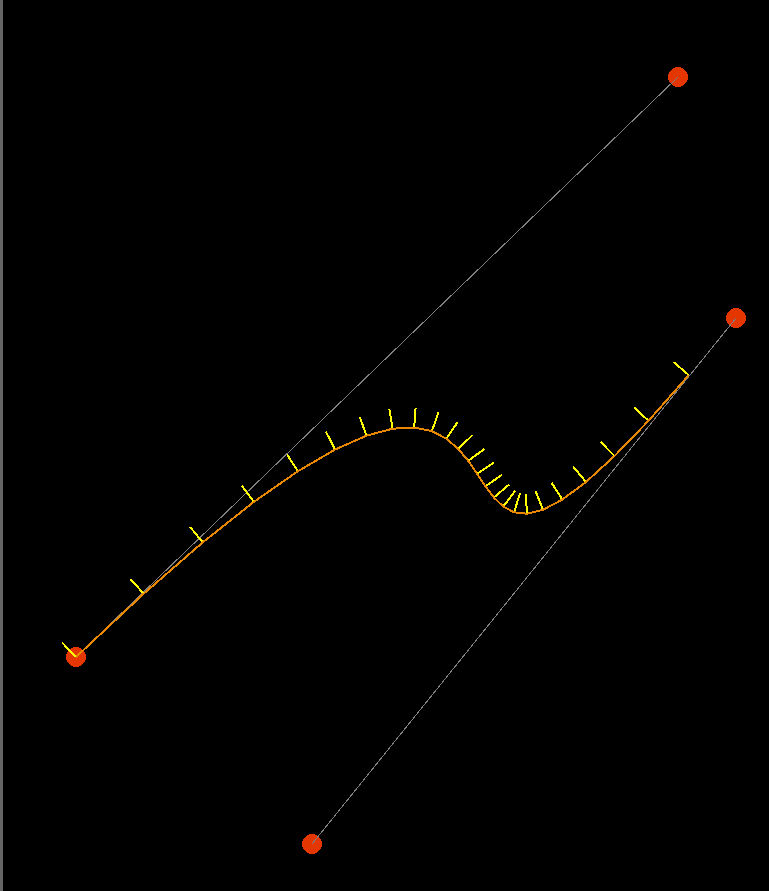
Here is an image of the tangents of a curve at a given t, perpendicular to the curve. You can also see the parametrization not being equal in the corner cases of the curve.

Moving an object along a Bezier Curve. Part I

Moving along in our topic of bezier curves and having an object move along the curve path, I will briefly demonstrate the easiest way to move an object along a curve path,  and talk about its limitations.

It is pretty straight forward to move an object along a path. For a bezier curve, we first get all the points that draw the curve and depending on how granular the curve, the number of points you will get back. It is a common trick to render the curve with average granularity, and then re-compute the points at a higher granular level to have as many points as possible to move the object along the path, conversely, you can computer lesser points to give the impression of the object moving ‘faster’.

Unfortunately, the difficulty lies in specifying the object’s speed if using t values. The computed x and y coordinates are not representative of a curve’s length, and a curve’s length and its relationship to the value of t is non-linear.

Pseudo code for this would be something like

local object =  display.newImage("tank.png",-100,-100);
local points = computeBezierPoints(granularity,segment[i]);

local p = points[1];

local prevX  = p.x;
local prevY  = p.y;

local angle        = 0;
local prevAngle = angle;

for i = 2; #points do
p = points[i];
angle = math.atan2(p.y - prevY,p.x - prevX);
angle = angle * (180/PIE)

object.x = p.x;
object.y = p.y;

object:rotate(angle-prevAngle);

prevAngle = angle;
prevX = p.x;
prevY = p.y;

end

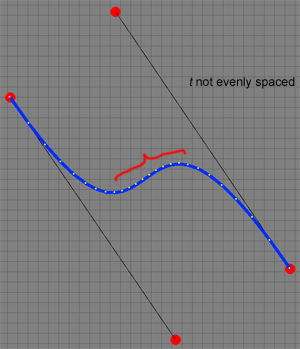
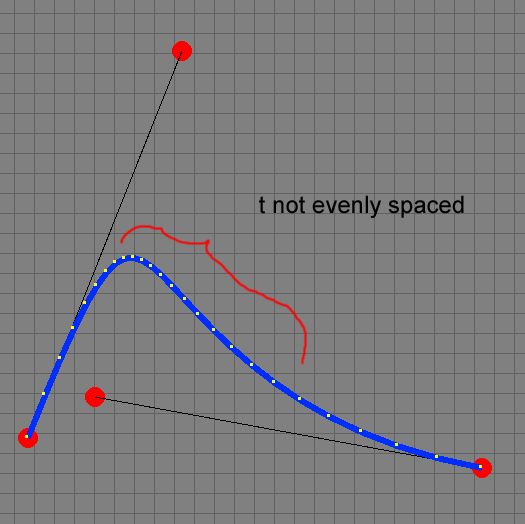
The above sample shows the first step towards moving an object along a curve path. But as you will see from the two images below, due to the nature of parametrization, t values are not evenly spaced, and depending on the curve, the object will move at different speeds at different t values on the curve segment.

The sample code to move an object along a bezier curve can be obtained by clicking here >>

So the question is, how do we make it so that the object moves seamlessly along the path and not at different speeds depending on its t value?

The answer is simple, computing it, is not. A way to do this is by computing the arc length the curve and re-parametrizing the curve . See “Arc Length Parametrization of Splines Curves” by John W. Peterson at >> .

Next up, what it takes to re-parametrize a curve, but before that, how to render Corona text along a path to demonstrate more fun with Bezier curves.

Carlos.