
I keep on getting e-mails on my Bezier code and in between them, how to draw the Bezier Handles.
It is very simple and it is pure trigonometry knowledge to pull it off.
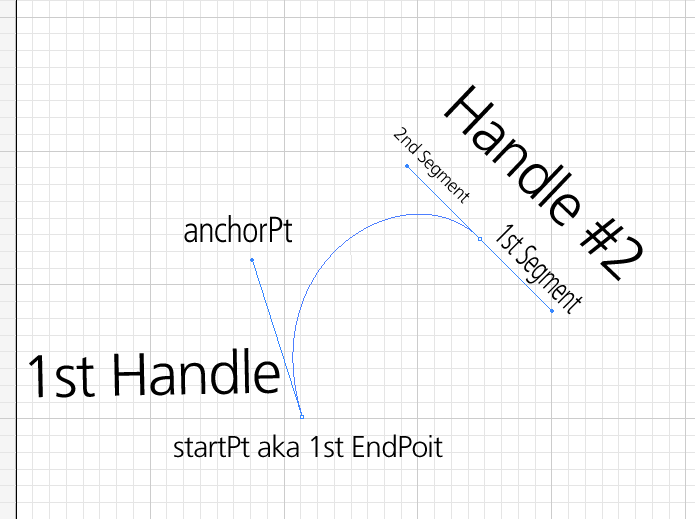
To draw the handle is very easy. Tap or Click where you would like the first anchor point is going to be, then drag towards the desired curvature is achieved. This draws the first handle. (startPt, anchorPt). If it is the first point in the curve, you will have to make sure to check in case yo don’t want to draw the reflection of the handle for the “previous curve segment”. If it is not the first point on the curve, then most likely you will want to draw the reflection of the handle for the next curve section. (A-la Illustrator Pen tool).
It goes something like this.
- 1st click = startPt
- endDrag = anchorPt.
- draw the first part of the handle
- find the length of the handle using standard distance formula
- find the arctangent of startPt.x and anchorPt.x over startPt.y and anchorPtr.y
- set opposite.X to the startPt.x minus the length of the segment multiplying it by the cosine of the arctangent
- set opposite.Y to the startPt.y minus the length of the segment multiplying it by the sine of the arctangent
- now draw the second part of the handle.
As an exercise, I will leave it up to you to write the code, but this is basic 101 trig and you should not have any problem drawing the Bezier handle.
Carlos
Mi primer programa en Atari 512 ST (1986 con TOS en disquete y luego en ROM), fue b-spline que es simplemente una generalización de una curva de Bézier.
Como ejercicio de programación es fantástico.
Javier Párraga
@japargon